
Last updated on August 25th, 2026 at 02:16 pm
The Powertrain Control Module (PCM) in your 1999 Chevrolet Tracker manages fuel delivery, ignition timing, and emissions systems. Failures may cause erratic engine behavior, stored trouble codes, or complete no-start conditions due to corrupted calibration data.
If your 1999 Chevrolet Tracker is experiencing unexplained stalling, rough idle, or a no-start condition, the Powertrain Control Module (PCM) may be the culprit. This small but critical computer manages everything from fuel injection to ignition timing, and when it fails, your vehicle’s performance can suffer in frustrating ways. Replacing the PCM isn’t just about swapping a part—it involves careful handling, proper installation, and, most importantly, reprogramming to match your Tracker’s specific calibration. Without the correct software, even a new module won’t function properly. Understanding the steps involved, from removal to relearn procedures, can save you time and avoid unnecessary trips to the shop. This guide covers what the PCM does, how to replace it, and why choosing the right replacement unit matters for your vehicle’s reliability.
The Powertrain Control Module (PCM) in your 1999 Chevrolet Tracker acts as the brain of the engine and transmission systems. It continuously monitors sensors for data like engine speed, air intake, and exhaust composition, then adjusts fuel delivery and ignition timing in real time. This ensures optimal performance, fuel efficiency, and emissions compliance. When the PCM fails, it can disrupt these calculations, leading to poor drivability or even preventing the engine from starting. Unlike older vehicles with separate engine and transmission controllers, the Tracker’s PCM integrates both functions into a single unit, making it a critical component for smooth operation. If you’re replacing the module, you’ll need replacement engine computers for the Tracker that are pre-programmed to avoid compatibility issues. Without the correct calibration, the new PCM may not communicate properly with the vehicle’s sensors or transmission, causing further problems down the road.
1999 Chevrolet Tracker
OEM programmed ECM for your 1999 Chevrolet Tracker — plug & play, no dealer visit.
Free shipping · Lifetime warranty
The PCM in your 1999 Chevrolet Tracker is typically located inside the vehicle, often mounted under the dashboard or behind the glove compartment. To access it, you may need to remove interior panels or trim pieces, which can add some time to the job. According to factory labor estimates, removing and replacing the PCM takes about 0.5 hours, while the Engine Control Module (ECM) replacement—though similar—requires 0.9 hours due to its placement. Before handling the module, ensure the battery is fully charged and the ignition is turned off to prevent electrostatic discharge or voltage spikes. The factory cautions against touching the connector pins or circuit board components directly, as even minor static electricity can damage the sensitive electronics. Once the old module is removed, the new unit should be installed carefully, ensuring all connectors are securely fastened. After installation, a relearn procedure is necessary, which adds another 0.5 hours to the process.
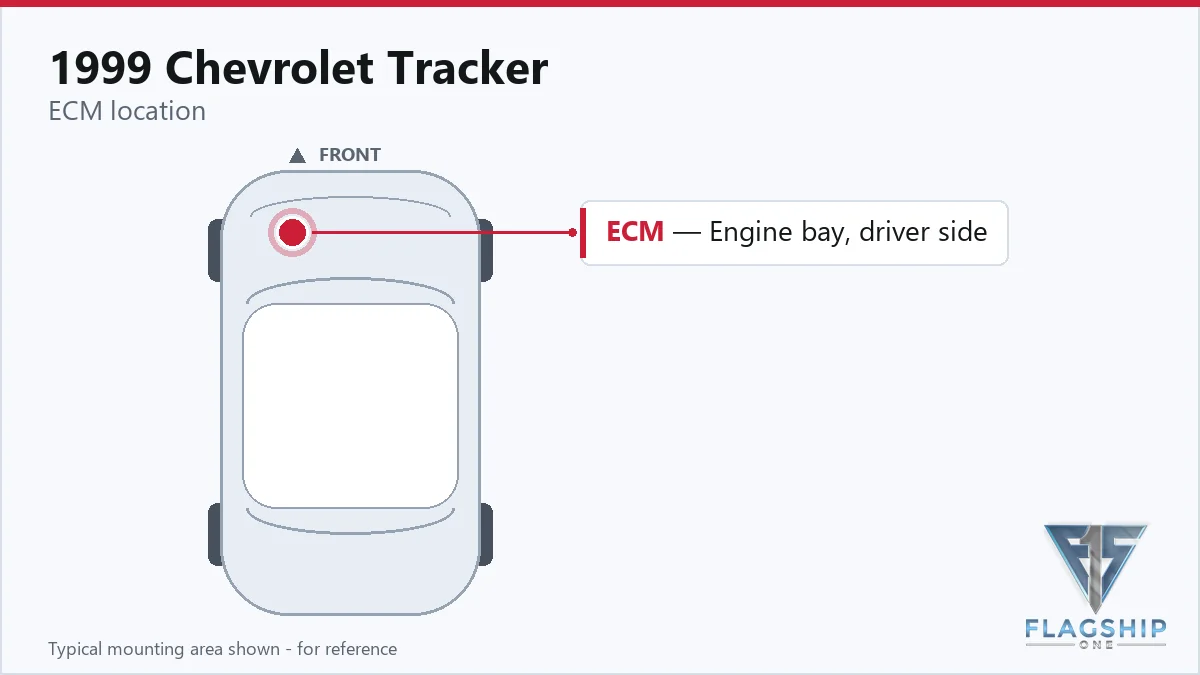
Work with the ignition off, and treat the module as static-sensitive: avoid touching the connector pins at any point.
| Operation | Configuration | Book Time |
|---|---|---|
| Powertrain Control Module R&R | All configurations | 0.5 hr |
| Powertrain Control Module Relearn | All configurations | 0.5 hr |
| Engine Control Module R&R | All configurations | 0.9 hr |
| Engine Control Module Relearn | All configurations | 0.5 hr |
After installing a new PCM in your 1999 Chevrolet Tracker, the module must be programmed with the correct calibration data to function properly. This process, often called ‘flashing,’ requires a Tech 2 scan tool connected to the vehicle’s diagnostic link connector (DLC). The technician must verify that all connections—including the scan tool, DLC, and PCM—are secure before initiating the reprogramming. The factory emphasizes that programming should only be done when directed by a service procedure or bulletin, as incorrect calibration can lead to driveability issues or stored trouble codes. However, if you opt for a VIN-programmed replacement unit, these steps are already completed, saving you time and ensuring the module is ready to install right out of the box. This eliminates the need for dealer programming and reduces the risk of errors during the flashing process.
A failing PCM in your 1999 Chevrolet Tracker can manifest in several ways, often mimicking other mechanical or electrical issues. One of the most common signs is a no-start condition, where the engine cranks but refuses to fire due to incorrect fuel or spark signals. You may also experience intermittent stalling, especially at idle or during deceleration, as the PCM struggles to maintain proper air-fuel ratios. Rough idling, misfires, or hesitation under acceleration are other red flags, often accompanied by the check engine light. In some cases, the transmission may shift erratically or fail to engage gears properly, since the PCM also controls transmission functions in this vehicle. Diagnostic trouble codes like internal control module memory checksum error may appear, indicating corruption in the module’s software or hardware. If your scan tool fails to communicate with the PCM at all, it could point to a complete module failure or a wiring issue. These symptoms can be frustrating, but they often lead back to the PCM when other potential causes—like spark plugs, fuel injectors, or sensors—have been ruled out.
The 1999 Chevrolet Tracker’s PCM can generate specific trouble codes when internal faults are detected. These codes help pinpoint issues within the module itself, rather than external sensors or wiring problems. Below is the documented module-internal trouble code for this vehicle.
| Code | Meaning | Full Guide |
|---|---|---|
| P0601 | Internal memory checksum error | Full P0601 guide → |
General Motors issued service bulletin #99-06-04-053 in October 1999, addressing PCM reprogramming procedures for the 1999 Chevrolet Tracker. The bulletin provides guidelines for technicians on when and how to update the module’s calibration to resolve driveability concerns or stored diagnostic trouble codes. It emphasizes the importance of following factory procedures to avoid unintended consequences, such as incorrect fuel mapping or transmission shift patterns. While the bulletin doesn’t specify particular symptoms, it underscores the need for reprogramming in certain diagnostic scenarios.
| Bulletin | Subject | What It Addresses |
|---|---|---|
| 99-06-04-053 | Info – PCM Reprogramming – (Oct 26, 1999) | — |
Random stalling after a PCM replacement often indicates an incomplete relearn procedure or incorrect calibration. The module needs to recalibrate to the vehicle’s sensors and transmission, which requires a specific process using a scan tool. If the relearn isn’t performed, the PCM may send incorrect signals to the engine, causing stalling or rough idle.
While the vehicle may still run with a P0601 code, it’s not advisable to ignore it. This code indicates an internal memory error in the PCM, which can lead to unpredictable behavior, such as poor fuel economy, misfires, or even a no-start condition. Addressing it promptly can prevent further damage to the module or other components.
Start by checking for power and ground at the PCM connectors. If those are intact, use a scan tool to see if the module communicates with the vehicle. If the scan tool can’t connect, the PCM may be faulty. However, if the tool connects but shows no data, the issue could be a wiring problem or a bad ground.
A used PCM from another vehicle may not be programmed with the correct calibration for your Tracker, even if it’s the same year and model. This can lead to driveability issues, such as incorrect fuel delivery or transmission shift points. Additionally, the module may store codes from the previous vehicle, complicating diagnostics.
Replacing the battery typically doesn’t require PCM reprogramming, but it may trigger a relearn procedure for idle settings or transmission shift points. If the vehicle runs poorly after a battery replacement, a quick drive cycle or scan tool reset may help the PCM recalibrate to the new electrical conditions.
If your 1999 Chevrolet Tracker is showing signs of PCM failure, you have options beyond a costly dealer visit. A refurbished replacement unit can restore your vehicle’s performance without the wait or expense of a new module. Since the Tracker’s PCM requires precise calibration, choosing a pre-programmed unit ensures compatibility and avoids the hassle of dealer flashing. Whether you’re dealing with a no-start condition or persistent trouble codes, a properly programmed module can get your Tracker back on the road reliably.
Flagship One stocks a refurbished, VIN-programmed PCM for the 1999 Chevrolet Tracker with a lifetime warranty, free shipping and no core charge. The full Chevrolet Tracker module lineup covers other engine configurations as well.
The PCM in your 1999 Chevrolet Tracker plays a vital role in keeping the engine running smoothly, and when it fails, the symptoms can be frustrating. From stalling to no-start conditions, a faulty module can disrupt your daily driving. Replacing it involves careful handling, proper installation, and, most importantly, ensuring the new unit is programmed correctly. By choosing a pre-programmed replacement, you can skip the dealer flashing process and get your Tracker back to its reliable self with minimal downtime.