
Last updated on August 25th, 2026 at 11:55 am
The engine computer manages fuel delivery and ignition timing within your 2020 Toyota 4Runner. When this unit fails, you may experience drivability issues or complete loss of power. Internal processing errors often trigger specific diagnostic trouble codes indicating processor malfunction within the control system.
Dealing with engine computer issues in your 2020 Toyota 4Runner can be frustrating when drivability suffers. You need clear information about what the component does and how replacement works. This guide explains the function of the control module within your truck and outlines the labor steps involved. You will learn about access points and factory time allowances for service. Understanding these details helps you prepare for repairs or evaluate professional estimates accurately. We cover specific diagnostic codes associated with internal processor failures. Proper knowledge ensures you avoid unnecessary procedures during the replacement process. Reading this provides a solid foundation for managing engine control system repairs effectively. Your vehicle relies on this computer for critical operations every day.
The engine control module manages critical functions like fuel injection and spark timing in your 2020 Toyota 4Runner. It processes sensor data to optimize performance and emissions compliance during operation. When this unit malfunctions, the engine may run poorly or fail to start entirely. You might notice hesitation during acceleration or irregular idling behavior under load. Replacing a failed unit often requires sourcing replacement engine computers for the 4Runner that match your specific configuration. These components communicate with various subsystems to maintain smooth power delivery. Without proper function, the vehicle cannot regulate essential parameters effectively. Internal faults can disrupt communication networks across the entire powertrain system. Technicians rely on diagnostic tools to verify signal integrity before replacement. Understanding the role of this computer helps you recognize symptoms early. Proper maintenance of electrical connections supports long-term reliability for this critical hardware.
2020 Toyota 4Runner
OEM programmed ECM for your 2020 Toyota 4Runner — plug & play, no dealer visit.
Free shipping · Lifetime warranty
The control module is located behind the sub-assembly beneath the lower instrument panel in your cabin. Technicians must remove this interior component to reach the electronic unit safely. Factory labor guides allocate 1.0 hours for removal and replacement of the powertrain control module. Similarly, the engine control module removal and replacement also requires 1.0 hours of booked time. Additional procedures involve relearning processes that typically take 0.5 hours for either module type. A reset procedure for the engine control module may require 0.3 hours separately. You should expect these time allowances when reviewing service estimates from repair shops. Access involves working within the interior area associated with the panel. Proper reinstallation ensures all electrical connections remain secure after service is complete. Following factory access steps prevents damage to surrounding trim pieces during the procedure.
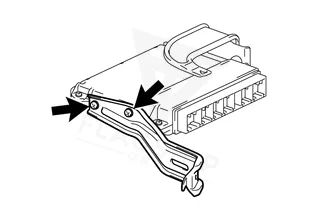
Work with the ignition off, and treat the module as static-sensitive: avoid touching the connector pins at any point.
| Operation | Configuration | Book Time |
|---|---|---|
| Powertrain Control Module R&R | All configurations | 1.0 hr |
| Powertrain Control Module Relearn | All configurations | 0.5 hr |
| Engine Control Module Relearn | All configurations | 0.5 hr |
| Engine Control Module R&R | All configurations | 1.0 hr |
| Engine Control Module Reset | All configurations | 0.3 hr |
Factory procedures typically require relearn steps taking 0.5 hours after installing a new module. A reset procedure may also be necessary and often takes 0.3 hours to complete. These actions ensure the computer communicates correctly with your 2020 Toyota 4Runner systems. However, Flagship One units arrive ready for installation without needing these steps. You receive a VIN-programmed replacement unit that eliminates the requirement for additional relearn labor. This approach saves time and reduces complexity during the repair process. The programming is completed beforehand to match your vehicle identification number. You can proceed with installation knowing the software configuration is already correct. This eliminates the need for specialized diagnostic tools during the final setup. Saving on labor time allows you to focus on mechanical installation tasks instead.
Common signs of module failure include unexpected stalling or difficulty starting your 2020 Toyota 4Runner. You may experience rough idling or hesitation during acceleration under normal driving conditions. Communication losses with scan tools often indicate internal processing errors within the computer. When the processor malfunctions, the vehicle may store internal processor fault codes in memory. This specific error suggests the main computer cannot execute commands properly. Misfire codes might appear alongside internal faults due to timing irregularities. Shifting issues can occur if the transmission control relies on faulty data. Dead communication networks prevent technicians from accessing diagnostic information effectively. These symptoms often worsen over time as the electronic components degrade further. Addressing these signs promptly helps prevent secondary damage to other systems. Recognizing these patterns allows for quicker diagnosis and repair resolution.
Internal diagnostic systems monitor the computer hardware for specific processing errors. When faults occur, the system logs codes indicating the nature of the failure. The following list represents documented module-internal trouble codes for this vehicle. These codes help technicians identify whether the computer itself requires replacement.
| Code | Meaning | Full Guide |
|---|---|---|
| P0606 | Module processor failure | Full P0606 guide → |
Factory procedures often mandate relearn steps taking 0.5 hours. However, pre-programmed units eliminate this requirement for your specific truck.
Access involves removing the sub-assembly beneath the lower instrument panel. This interior component must be taken down to reach the module.
Factory guides allocate 1.0 hours for removal and replacement. Additional time may be needed for reset or relearn procedures.
You may choose between repairing your existing unit or installing a refurbished replacement. Refurbished options often provide a more reliable solution for internal processor failures. For your 2020 Toyota 4Runner, replacement ensures all internal components meet original specifications. This path avoids potential recurring issues associated with repaired circuit boards. Evaluating both options helps you decide the best course for your budget.
Flagship One stocks a refurbished, VIN-programmed PCM for the 2020 Toyota 4Runner with a lifetime warranty, free shipping and no core charge. The full Toyota 4Runner module lineup covers other engine configurations as well.
Understanding the engine control module helps you manage repairs for your 2020 Toyota 4Runner effectively. Proper installation and programming ensure long-term reliability for your truck. Review your options carefully before proceeding with any service work. Contact technical support if you need clarification on compatibility or procedures.